The Retreat Bulletin Board
The Retreat Bulletin Board
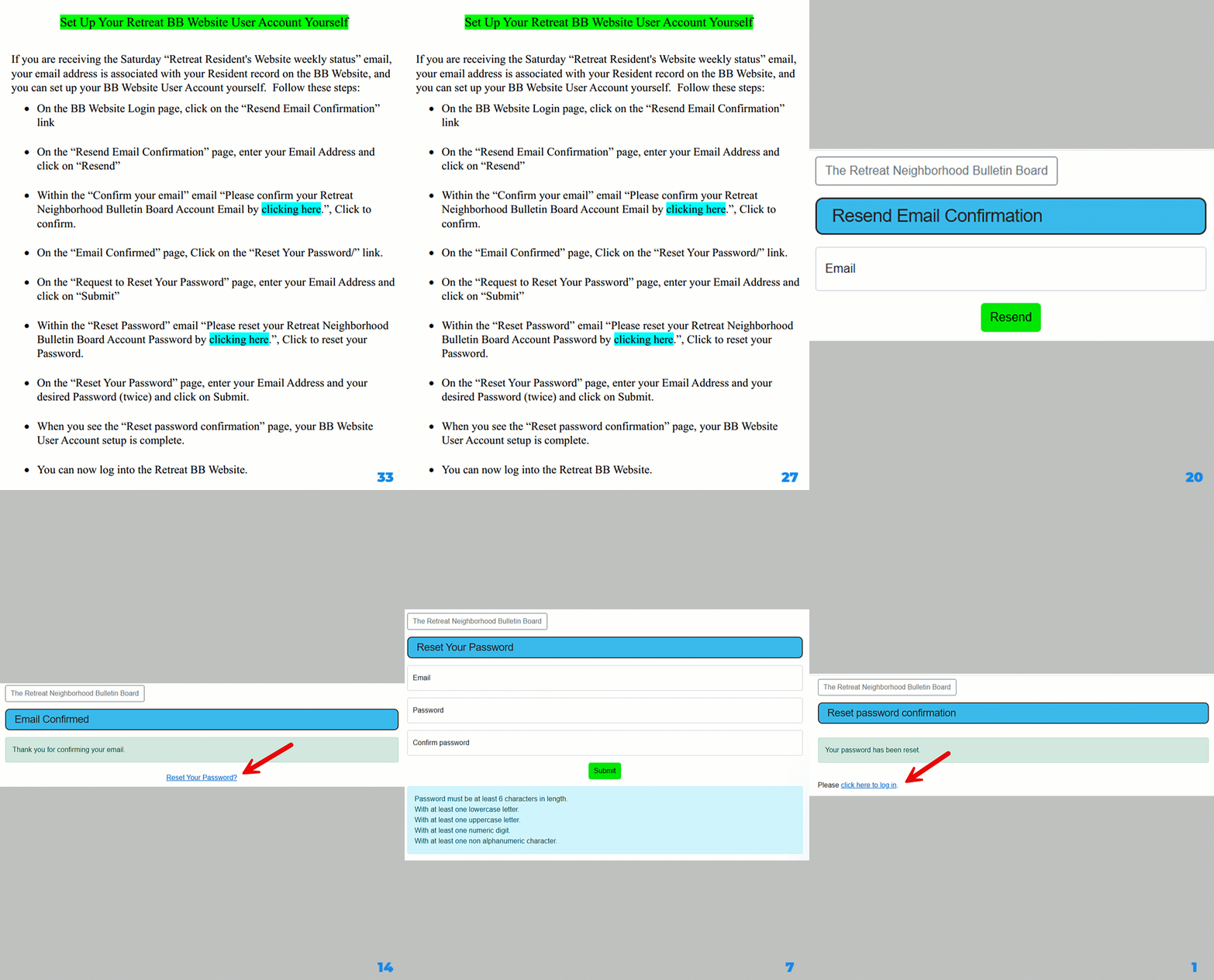
If you are receiving the Saturday “Retreat Resident's Website weekly status” email, your email address is
associated with your Resident record on the BB Website, and you can set up your BB Website User Account yourself.
Follow these steps (which are shown on the video clip):
- On the BB Website Login page, click on the “Resend Email Confirmation” link
- On the “Resend Email Confirmation” page, enter your Email Address and click on “Resend”
- Within the “Confirm your email” email “Please confirm your Retreat Neighborhood Bulletin Board Account Email by clicking here.”, Click to confirm
- On the “Email Confirmed” page, Click on the “Reset Your Password/” link
- On the “Request to Reset Your Password” page, enter your Email Address and click on “Submit”
- Within the “Reset Password” email “Please reset your Retreat Neighborhood Bulletin Board Account Password by clicking here.”, Click to reset your Password
- On the “Reset Your Password” page, enter your Email Address and your desired Password (twice) and click on Submit
- When you see the “Reset password confirmation” page, your BB Website User Account setup is complete
- You can now log into the Retreat BB Website